Most of us use social apps without thinking where our stuff - our posts, photos, messages, and more - is actually located. They usually sit on some random company’s server, and that company decides what happens to that data. If your favourite site goes down, or if the company decides to delete your account, you’ll lose access to your content (posts, comments) and your identity (handle, profile, etc.). This isn’t a great situation for users, and it’s not a great situation for what the internet is supposed to be.
So, what if you could have that not happen to you? What if you could persist your content and identity, even if a social media site goes down?
Sign in with something.
I guess we should start with something we all know about. Sign in with Google. When you sign in with Google, you’re using your Google account to authenticate yourself on another site. The other site doesn’t have to manage your password or identity; it relies on Google to do that. It’s super convenient for the end user as well! Everyone (or mostly everyone) has a Google account, so you don’t necessarily have to create a new account for every site you use. This is a great example of a federated identity system, where one identity provider (Google) can be used across multiple services.
What, though, if Google went down? While improbable, you’d probably lose access to all the sites you signed in to with Google. This is a problem with most federated identity systems: if the identity provider goes down, you lose access to all the services that rely on it.
But, there’s something kind of novel we can do to mostly solve this problem. We can use a decentralized identity system (or DID), where your identity theoretically isn’t tied to any one service provider1 via an identity document hosted on that decentralized system. This means that if your identity provider goes down, you should be able to move your identity to another provider and keep using your account.
Decentralized identity
Decentralized identity isn’t a new idea. It’s been around for a while, and there are several different implementations. One of the ones used in the Atmosphere is called “did:plc” (“plc” originally stood for “placeholder” but now stands for “public ledger of credentials”).
Your own data server?
Most apps also keep your data on their own servers. Your own stuff lives inside their app. But you’ve probably seen a slightly better version of this. Some apps can save right to your Google Drive, Dropbox, or other cloud storage. A great example of this is a diagramming tool called draw.io. It doesn’t save your diagrams on its own servers. If that app shuts down, you don’t lose your diagrams, as you can open and those files in another, compatible, diagramming tool entirely. This is a good example of portable data. You can take your data with you, and you can use it in other apps.
Portable data is one of the key ideas behind the Atmosphere. But, the difference from Drive is who owns the storage.
In the Atmosphere, it isn’t necessarily the company’s, it can be your own, or someone you trust.
The place where your data lives is called a “Personal Data Server” (PDS). You can choose where your PDS is hosted, and you can even run your own PDS if you want. This means that if an atmosphere-based social media site shuts down, you don’t lose your data. Your data is still safe on your PDS.
So, Google hands you two convenient things: an identity you sign in with, and a place to keep your files. Both of them are Google’s. the Atmosphere is what it looks like when both are yours instead. A network (the AT Protocol, or atproto for short) with an identity no single company holds, and storage you can put wherever you like, or run yourself. Almost everything else about how it works falls out of those two ideas.
What’s even in there?
If you’ve been using Atmosphere apps, you’ve probably been storing things without even realizing it. The PDS stores documents, like your posts, photos, comments, and public profile. But more things can also be documents, like your social graph (who you follow, who follows you), and even your likes and reposts, and (importantly!) blocks. Most public actions you take on an Atmosphere app that produce some output are stored in your PDS.
These are things that are yours, the “original copies” of your data. When the app shows your posts, the origin of these posts are on your PDS3. Same with your profile, your social graph, and your likes and reposts. Any app can fetch these documents from your PDS. This is why a new app can open and already know who your friends are, it’s reading from the same place your other apps are reading from.
Okay, but what about the apps?
Your storage holds your raw stuff, but raw stuff isn’t an app. Your PDS is quite simple, it doesn’t have the idea of a “timeline” or any kind of aggregate data (e.g. how many people liked/reposted something). All of this data has to be gathered out of everyone’s storage at once and arranged. The piece that does this gathering and assembling has a name; people call them AppViews4. It reads across the network, keeps track of things like like-counts and replies, and builds the screens you actually look at. Each app can bring its own, which is why the same posts can appear as a scrolling microblog in one app and a grid of photos in another.
There are a bunch of apps for many different use cases, and while most apps stay relatively separate, some apps may take from another - for example, a short-form video app may support videos that people post on a microblogging app. App developers can pick and choose which data they want to take from - from just their own, to all data in the network if they want!
Aside on lexicons
But that raises a question. If a photo app and a microblog app are built by different people who’ve never spoken, how does one app make any sense of the other’s data? Why doesn’t it all turn to mush?
This is because the shape of each kind of thing is agreed on ahead of time. A microblog post has a known shape, a photo has a known shape, an RSVP has a known shape. These agreed-on data shapes are called lexicons. As long as two apps both speak the same lexicon, they can read and write each other’s stuff, even if their developers have never met. It’s the same reason any photo app can open a .jpg: everyone agreed what a JPG looks like, so no single company controls it. A lexicon is that, but for social things, such as a post, a like, a follow, a scrobble, and even a film review.
The fun part is that nobody hands out permission to make new ones. Anyone can define a new lexicon shape and just start writing it into their storage. Want “recipe” to be a thing? Or “chess move,” or “song I just listened to”? Define the shape, start posting it, and if it’s any good, other apps can start reading it. New kinds of content don’t need a gatekeeper’s blessing; they just need a shape and someone willing to use it5
This is why apps in the Atmosphere can lean on each other instead of walling themselves off. Most apps mostly keep to their own kind of thing, but they don’t have to — a short-form video app can happily show videos that someone posted through a microblogging app, because it’s the same kind of underlying record. Developers get to pick and choose what they read, anywhere from “just my app’s data” to “everything on the whole network.”
One important thing: all this data is public by default. Your storage is less like a private folder and more like a public storage bucket; that’s how other people and apps find your posts in the first place. Private things — direct messages, followers-only posts, private group spaces — are being actively built into atproto, but they aren’t here yet. For now, treat it as a public square, not a diary.
A note on privacy
You may notice that some apps have private features anyway, like synced settings and direct messages or group chats. Most of these are built with more traditional backend services, off to the side of atproto. That means you can mix and match: atproto features where you want openness and portability, ordinary backend services where you need privacy — or you can ignore most of it and just use atproto as a smarter “sign in with Google.”
So where does a post actually go?
Let’s follow a single post from the moment you hit “send.”
When you write a post, the app you’re using does one main thing with it: it saves the post as a document in your PDS. That’s the original, the canonical copy lives in your storage, not on the app’s servers. The app helped you make it, but it doesn’t hold it.
Writing the post
The instant that document lands in your PDS, your account announces it to the rest of the network. This is an event stream that we send to an aggregation service called a Big Graph Server or Relay
Announcing it
AppViews sit downstream of the relay, listening. These are the services that pick the documents they care about (including yours) out of the stream, update their tallies (the reply counts, the like counts), and file it into the feeds or whatever that they’re building. So when one of your followers opens their app, the AppView hands them a timeline that already has your post in it. assembled from these event streams, and not their own internal database.
Reading it back
And that’s really the whole point. The app wrote the post to your storage and announced it to the network; everything after that is other services reading your public data. It seems kind of wasteful at first, but this enables a world of things that you can’t do with a traditional app.
What about Mastodon?
If you’ve heard of Mastodon, this can sound familiar as both are trying for an open social web that no single company runs. The difference is primarily with one’s identity and storage.
On Mastodon at the moment, you join a particular server, and your name and followers are tied to it; moving servers can mean starting much of it over unfortunately; moving servers is basically just a fancy redirect. Luckily this seems to be moving in the right direction, with some people on Mastodon experimenting with decentralised identity systems.
This happens less often on the Atmosphere, as identity and storage are not intrinsically tied together, or even tied solely to the apps you use.
Why would anyone build on this?
On a normal platform, if you want to make a social app, step one is building all the boring stuff nobody sees: accounts, logins, a followers system, a way to store everyone’s posts. You rebuild the wheel, and then you have to convince people to sign up and find their friends all over again. It’s always a huge pain to do all of this.
On Atproto, most of this already exists, so this means no rebuilding everything again. This also means we can share data among apps. Identity, a social graph, and data storage. If an app chooses to, they can simply read it for themselves. Someone can ship a brand new app, you can sign in with the account you already use, and there’s a larger-than-normal chance your friends are already there. The hard part of making a new app, the people, comes a lot more easily if you can just use the account you already have.
You can see this as a threat, but most people view it more of a feature. On a closed platform, if an outsider builds a better app than the official one, that’s an issue for the platform. In the Atmosphere, it’s more or less expected. Everyone can build their own view of the same shared data, so “third party” and “first party” mean a lot less. It gives really good ground for experimentation and different kinds of aggregation; see, as an example, the Feeds feature on Bluesky. Any random developer can make their own feed, but there’s one that everyone tends to aggregate around; the For You feed. The best version of a thing wins, no matter who made it.
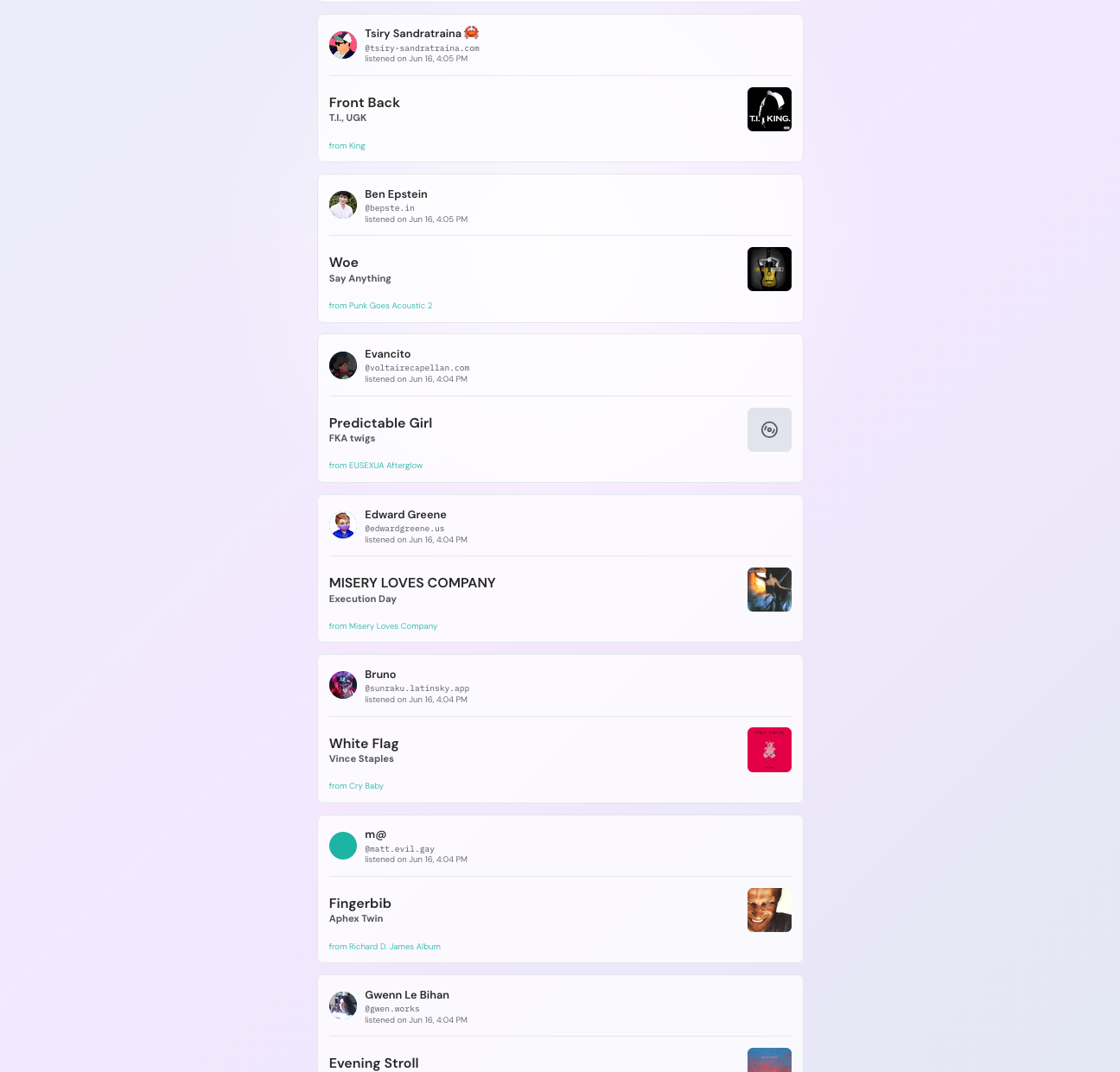
It leads to genuinely weird yet good situations. Dan Abramov has a great example of this: there’s a music-scrobbling project where the actual app barely exists yet. The scrobbler for that project is out, and the frontend is mostly a landing page. But because people were already saving their “I played this track” records into their own storage, someone else simply built a working viewer for them. Hundreds of thousands of plays, displayed live, for a product that technically isn’t a product. The data showed up before the app did, by design, and a viewer was simply made for them, no permission needed to be given or anything.
There’s also a whole category of apps that can’t quite exist yet, private communities, gated content, paid posts, because the private-data side of atproto is still being built. A lot of people are lining up to make those the moment it lands.
What people have actually built
A lot of this is easier to feel out rather than explain, so here’s a real example: a whole bunch of actual apps, each a completely different kind of thing, but they all share the same identity, and the public data comes from the same place.
- Bluesky is the short-post network most people arrive through; it’s the closest thing the Atmosphere has to a front door.
- Streamplace is video on the Atmosphere. think Twitch or YouTube, but built on the open network, so your audience and your identity come with you instead of belonging to the platform.
- Leaflet is for long-form writing: blog posts, essays, documents. A lot of the people building atproto publish their own writing here, which tells you something.
- Tangled is collaborative code hosting, roughly GitHub, with repositories, issues, and a bunch of other fancy features.
- Grain is photo sharing with its own feel, built from the ground up for a different audience compared to Bluesky.
- Popfeed is for rating and reviewing films, TV, games, books, and music. A Letterboxd-ish corner where your reviews and lists are records you own.
- atmo.rsvp is events and RSVPs. Its own tagline puts it well: the events live on your account, not theirs, so your “yes” travels with you.
- Semble is for collecting and sharing links and resources: public collections other people can add to, aimed at the research-and-rabbit-holes crowd.
You can sign into all of them with the same handle, and everything you make gets saved to your PDS. A microblog, a video platform, a code forge, a photo app, an events tool: one identity, wearing a lot of different clothes.